

Office paper shredders are essential tools for protecting sensitive information and maintaining privacy. However, many businesses replace these machines far too often due to preventable damage. Understanding proper maintenance and usage can significantly extend your shredder’s life, saving money and reducing waste. This guide provides practical strategies to keep your shredder running smoothly for years.
Understanding Your Shredder’s Capabilities
Every paper shredder comes with specific limitations. Knowing these boundaries helps prevent premature wear and tear. Most manufacturers provide detailed specifications about what their machines can handle. Therefore, reading the user manual should be your first step.
The capacity rating indicates how many sheets you can shred at once. Exceeding this number forces the motor to work harder than designed. Similarly, the duty cycle tips specify how long the machine can run before needing rest. Ignoring these guidelines leads to mechanical failures and shortened equipment life.
Different shredder types serve different needs. Strip-cut models work faster but offer less security. Cross-cut versions provide better protection but run slower. Micro-cut shredders deliver maximum security yet require more power. Understanding your model’s design helps you use it appropriately.
Managing Heat Buildup Effectively
Heat represents one of the biggest threats to shredder longevity. Motors generate warmth during operation, and this heat accumulates over time. Without proper management, internal components can suffer permanent damage.
Modern machines often include overheating protection systems that automatically shut down when temperatures rise too high. However, relying solely on this feature is unwise. Prevention works better than cure. By managing your shredding sessions carefully, you can avoid triggering these safety mechanisms altogether.
Pay attention to how long you run the machine continuously. Most office shredders need breaks after extended use. The motor cools down during these rest periods, preventing damage to electrical components. Additionally, ambient room temperature affects performance. Shredders in hot environments reach critical temperatures faster than those in climate-controlled spaces.
Ventilation plays a crucial role in heat management. Ensure your shredder has adequate space around it for airflow. Tucking it into tight corners or against walls restricts air circulation. This causes heat to build up more quickly, stressing the motor unnecessarily.
Following Manufacturer Guidelines
Manufacturers test their equipment extensively before release. The specifications they provide reflect real-world testing data. Therefore, following these guidelines protects your investment and ensures optimal performance.
Check the recommended duty cycle for your model. This information tells you how many minutes the shredder can run within a given time period. For example, a machine might handle ten minutes of continuous shredding followed by a twenty-minute cooldown. Respecting these limits prevents motor burnout and extends overall lifespan.
Sheet capacity recommendations deserve equal attention. Feeding too much paper at once strains the cutting mechanism and motor. Even if the shredder manages to process an oversized stack occasionally, repeated overloading accelerates wear on critical components. Stick to the specified sheet count for every shredding session.
Material restrictions also matter significantly. Most shredders handle standard paper without issues. However, cardstock, glossy paper, and laminated documents require more power to cut. Some models explicitly prohibit certain materials. Using prohibited items can damage blades and jam mechanisms, leading to costly repairs.
Implementing a Regular Maintenance Schedule
Consistent maintenance keeps shredders running smoothly and prevents unexpected breakdowns. Creating a simple schedule ensures you never overlook important care tasks. Moreover, regular attention helps you spot potential problems before they become serious.
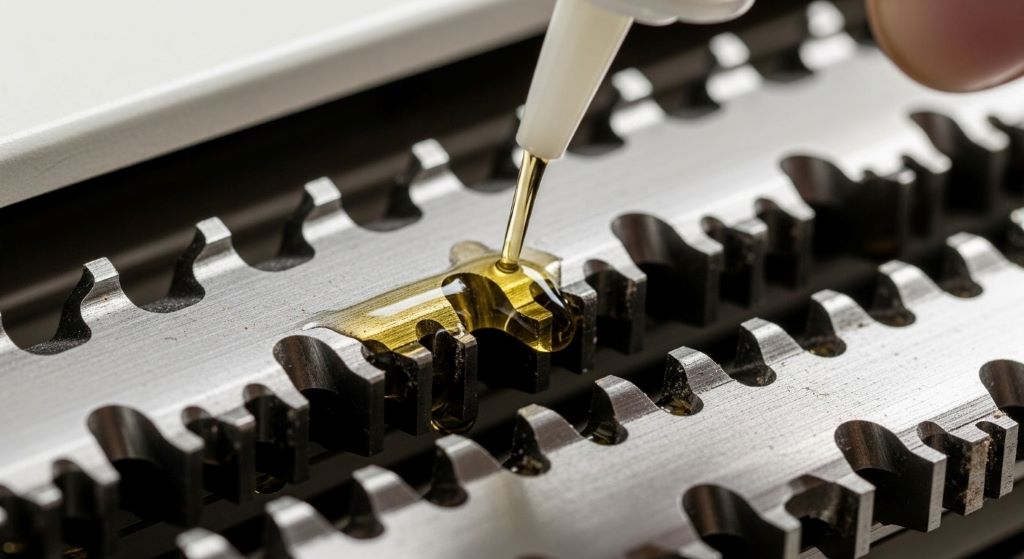
Blade maintenance should happen frequently. Paper dust accumulates on cutting surfaces, reducing efficiency and increasing friction. This buildup forces the motor to work harder, generating excess heat. Fortunately, maintenance is straightforward. Special shredder oil lubricates blades and removes residue. Apply it according to manufacturer recommendations, typically after every few hours of use.
Empty the waste bin regularly, even if it does not appear full. Overfilled bins restrict paper flow and cause jams. They also reduce airflow around the motor, contributing to heat issues. Establishing a routine for bin disposal prevents these problems entirely.
Inspect the machine periodically for signs of wear. Look for unusual noises, slower operation, or difficulty starting. These symptoms often indicate developing problems. Addressing them early prevents complete failure and expensive replacements.
Clean the exterior housing and paper entry slot regularly. Dust and debris can enter the mechanism through these openings. A simple wipe-down with a dry cloth keeps the machine clean and functioning properly. Never use liquid cleaners near electrical components, as moisture can cause short circuits.
Preventing Paper Jams
Paper jams are frustrating and potentially damaging. They force you to reverse the shredder or manually remove stuck paper. Frequent jams accelerate wear on the motor and cutting mechanism. However, most jams are preventable with proper technique.
Feed paper straight into the entry slot. Angled insertion causes uneven cutting and increases jam risk. Remove paper clips, staples, and binder clips before shredding. These metal objects can damage blades or jam the mechanism entirely. Although some shredders claim to handle staples, removing them anyway extends blade life.
Avoid shredding folded or crumpled paper when possible. These items do not feed smoothly and often cause jams. If you must shred such documents, flatten them first or reduce the number of sheets you feed simultaneously.
Never force paper into the shredder. If the machine resists, you are likely exceeding capacity or inserting material incorrectly. Forcing creates jams and stresses mechanical components. Instead, reduce the stack size or check your insertion angle.
When jams do occur, address them immediately and carefully. Turn off the shredder before attempting removal. Many models include a reverse function that helps clear minor jams. For stubborn blockages, consult your manual for safe removal procedures. Pulling paper out forcefully can damage blades or motor components.
Optimizing Your Shredding Workflow
How you organize shredding tasks affects machine longevity significantly. Strategic planning reduces wear and improves efficiency. Therefore, developing smart habits pays dividends over time.
Batch your shredding sessions rather than running the machine constantly throughout the day. This approach allows for adequate cooling between uses. It also reduces motor starts and stops, which stress electrical components more than continuous running.
Distribute shredding tasks among multiple machines if your office has several. This practice prevents any single shredder from bearing the entire workload. Consequently, all machines last longer and perform more reliably.
Consider document volume when selecting shredding times. Running the machine during cooler parts of the day helps manage heat buildup. Early morning or late afternoon often work better than midday, especially in warm offices.
Train all employees on proper shredder use. Many machines fail prematurely because users do not understand correct operation. A brief training session ensures everyone knows capacity limits, proper feeding techniques, and basic maintenance procedures. This investment in education protects your equipment investment.
Choosing the Right Shredder Initially
Selecting an appropriate shredder for your needs prevents many future problems. An undersized machine will struggle constantly, while an oversized one represents unnecessary expense. Therefore, careful initial selection matters tremendously.
Assess your typical shredding volume honestly. Count how many documents you shred weekly and calculate the average. Choose a machine rated well above your normal usage. This buffer ensures the shredder never operates at maximum capacity, which extends its working life considerably.
Consider future growth when making your selection. A machine that barely meets current needs will become inadequate as your business expands. Upgrading costs more than purchasing appropriate capacity initially. Additionally, plan for occasional high-volume periods when shredding needs spike temporarily.
Commercial-grade shredders cost more upfront but offer superior durability. They feature stronger motors, better overheating protection, and longer duty cycles. For offices with consistent shredding needs, this investment pays for itself through extended lifespan and reduced downtime.
Read reviews from actual users before purchasing. Real-world experiences reveal reliability issues that specifications do not show. Pay particular attention to comments about longevity and common failure points. This research helps you avoid problematic models and select reliable options.
Recognizing Warning Signs
Understanding early warning signs helps you address problems before they cause permanent damage. Catching issues early often means simple fixes instead of expensive replacements. Therefore, stay alert to changes in your shredder’s performance.
Unusual noises indicate developing problems. Grinding, squealing, or rattling sounds suggest mechanical issues requiring attention. The motor should run relatively smoothly and quietly. Changes in sound patterns deserve investigation.
Reduced shredding speed often signals blade dullness or motor wear. If your machine takes noticeably longer to process the same number of sheets, maintenance is overdue. Lubricating blades sometimes resolves this issue. However, persistent slowness might indicate more serious problems.
Frequent overheating shutdowns suggest excessive use or inadequate cooling periods. Review your usage patterns against the duty cycle tips provided by the manufacturer. You may need to adjust your shredding schedule or consider a higher-capacity machine.
Difficulty starting or intermittent operation points to electrical problems. These issues require professional attention, as attempting DIY repairs on electrical components can be dangerous. Contact the manufacturer or an authorized service center for diagnosis and repair.
Environmental Considerations
The environment around your shredder affects its performance and lifespan. Creating optimal conditions helps the machine function efficiently. Moreover, simple environmental adjustments prevent many common problems.
Temperature control matters significantly. Shredders operate best in moderate temperatures between 60 and 75 degrees Fahrenheit. Extremely hot or cold environments stress components and affect performance. If possible, place your shredder in a climate-controlled area away from heating vents or direct sunlight.
Humidity levels also impact operation. Very dry air increases static electricity, causing paper to stick together and feed improperly. Conversely, high humidity can make paper limp and difficult to shred cleanly. Maintaining moderate humidity levels promotes smooth operation.
Dust and debris in the surrounding area can enter the shredder mechanism. Keep the machine in a relatively clean space away from dusty activities. Regular cleaning of the surrounding area reduces the amount of debris that can infiltrate internal components.
Stable placement prevents vibration damage. Ensure your shredder sits on a level, sturdy surface. Unstable positioning causes excessive vibration during operation, which loosens components and accelerates wear. Some heavier models benefit from rubber feet or pads that dampen vibration.
Professional Servicing and Repairs
Even with excellent maintenance, shredders eventually need professional attention. Knowing when to seek expert help prevents minor issues from becoming major failures. Therefore, do not hesitate to contact professionals when necessary.
Annual professional servicing extends equipment life significantly. Technicians can perform deep cleaning, replace worn parts, and adjust mechanisms for optimal performance. This preventive maintenance catches problems you might miss during routine care.
If your shredder is under warranty, use authorized service centers for repairs. Unauthorized repairs often void warranties and may cause additional damage. Keep warranty documentation accessible and understand what coverage includes.
For older machines, evaluate repair costs against replacement expenses. Sometimes investing in a new shredder makes more financial sense than repairing an aging model. Consider the machine’s age, repair history, and current market prices when making this decision.
Document all maintenance and repairs performed on your shredder. This record helps identify patterns and proves valuable if warranty claims become necessary. Additionally, it provides useful information for the next owner if you eventually sell or donate the machine.
Conclusion
Extending your office paper shredder’s lifespan requires attention to several key factors. Understanding your machine’s capabilities and respecting its limits forms the foundation of good care. Managing heat through proper usage patterns and adequate rest periods prevents the most common cause of premature failure. Following manufacturer guidelines about capacity and materials protects mechanical components from unnecessary stress.
Regular maintenance keeps blades sharp and mechanisms clean. Preventing paper jams through proper feeding techniques reduces wear and frustration. Strategic workflow planning distributes usage evenly and allows for necessary cooling periods. Choosing the right shredder initially ensures the machine can handle your needs without constant strain.
Environmental factors like temperature and placement affect performance significantly. Recognizing warning signs early allows for timely intervention before major damage occurs. Professional servicing provides deep maintenance that extends working life beyond what home care achieves alone.
By implementing these strategies consistently, you can significantly extend your shredder’s operational life. This approach saves money, reduces waste, and ensures reliable document destruction for years to come. The investment of time in proper care and maintenance pays substantial dividends through improved performance and longevity.
Frequently Asked Questions
How often should I oil my paper shredder?
Most manufacturers recommend oiling after every two hours of use or once monthly for moderate usage. However, frequency depends on your specific model and usage patterns. Check your user manual for precise recommendations. Signs that oiling is needed include slower operation, unusual noises, or incomplete shredding. Using proper shredder oil rather than household alternatives ensures optimal performance and prevents damage.
What should I do if my shredder overheats frequently?
Frequent overheating typically indicates excessive continuous use beyond the recommended duty cycle. Allow longer rest periods between shredding sessions and reduce the amount of time you run the machine continuously. Ensure adequate ventilation around the unit and check that the room temperature is not too high. If problems persist after adjusting usage patterns, the machine may be undersized for your needs or require professional servicing.
Can I shred credit cards and CDs in my paper shredder?
This depends entirely on your specific model. Some shredders include designated slots for credit cards and optical media, while others handle only paper. Using your paper-only shredder for hard materials will damage the blades and void your warranty. Always check your user manual before attempting to shred anything other than paper. If your model permits these materials, use them sparingly to minimize wear.
Why does my shredder jam frequently even when I follow capacity limits?
Frequent jams despite proper loading often result from blade dullness, insufficient lubrication, or feeding technique issues. Try oiling the blades thoroughly and ensuring paper enters straight rather than at an angle. Remove all paper clips and staples before shredding. Check that you are not mixing paper types with different thicknesses in the same load. If jams continue, worn blades may need professional sharpening or replacement.
How long should an office paper shredder typically last?
With proper maintenance and appropriate usage, quality office shredders typically last five to ten years. Commercial-grade models often exceed this range, while budget consumer models may last three to five years. Lifespan depends heavily on usage volume, maintenance consistency, and initial quality. Machines used within their duty cycle specifications and maintained regularly last significantly longer than those operated beyond their design limits.
Related Topics:
How to Print Professional Shipping Labels at Home
Optimizing Office Performance on Low-spec Devices Without Lag