

Ever bought a game on Steam, played it for a few minutes, and realized it wasn’t what you expected? Maybe it crashed your system, or it just didn’t live up to the hype. Whatever the reason, Valve’s Steam platform offers one of the most flexible digital return policies in the gaming industry — but only if you know how to use it properly.
In this comprehensive guide, we’ll break down Steam’s return policy in simple terms, walk you through the refund process, explain eligibility rules, and answer the most frequently asked questions. Whether you’re a casual player, hardcore gamer, or a parent buying for your child, this article will help you understand how to get your money back with minimal hassle.
Let’s dive in.
What Is the Steam Return Policy?
Steam’s official return policy allows users to request a refund for most purchases made on the platform — including games, downloadable content (DLC), software, and in some cases, even in-game items. However, the key criteria are:
- The purchase must have been made within the last 14 days
- You must have played the game or used the content for less than 2 hours
If these conditions are met, Steam will almost always issue a full refund, no questions asked.
Why Steam’s Refund Policy Stands Out
Unlike many digital platforms where “all sales are final,” Steam prioritizes customer satisfaction. Their policy gives gamers the chance to test games risk-free, which builds trust in the platform. It also discourages developers from releasing buggy or unfinished titles.
How to Request a Refund on Steam (Step-by-Step)
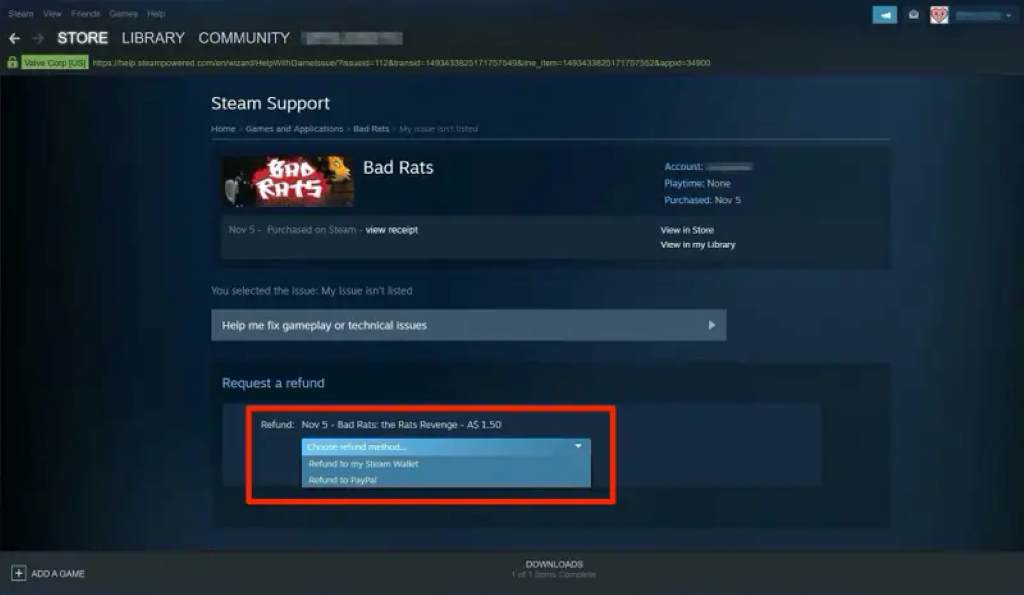
Here’s how you can request a refund using your PC, Mac, or Steam Deck:
Step 1: Visit Steam Support
- Go to https://help.steampowered.com
- Log in with your Steam account credentials.
2: Select the Game or Item
- Click on “Purchases”
- Find and click the game or item you want to refund.
3: Choose a Reason
- Steam will ask you what went wrong. Options include:
- “It’s not what I expected”
- “Gameplay or technical issues”
- “I purchased this by accident”
- Choose the option that best fits your situation.
4: Request the Refund
- Click “I’d like to request a refund.”
- Choose your preferred refund method: Steam Wallet or original payment method
- Submit the request.
You’ll get an email confirmation immediately. Most refund decisions are made within 24–72 hours.
What Can You Refund on Steam?
Steam’s refund policy covers more than just full games. Here’s a breakdown:
✅ Eligible for Refund:
- Games (within 14 days & under 2 hours of playtime)
- DLC (if not significantly used or altered core game)
- Pre-purchased games (within 14 days of release)
- In-game purchases (if made in Valve-developed games and unused)
- Software tools (under 2 hours of usage)
- Bundles (as long as none of the items are marked “non-refundable” and total playtime is under 2 hours)
- Steam Wallet funds (if unused and requested within 14 days)
❌ Not Eligible for Refund:
- Movies
- Gifts redeemed by another account
- VAC banned games
- In-game purchases in third-party titles (varies by developer)
- Games purchased outside Steam (e.g., key resellers)
Key Terms You Should Know
To better understand how the system works, it helps to know a few common terms related to Steam refunds:
- Playtime: Time actively spent in the game. Even idle time counts.
- Refund Window: 14 calendar days from the date of purchase.
- Steam Wallet: Virtual balance in your account. Refunds here are instant.
- Original Payment Method: Credit card, PayPal, etc. Refunds may take 5–7 business days.
Check out also: Jomashop Return Policy
Steam Refund Policy: Frequently Asked Questions (FAQs)
1. Can I refund a game I bought during a Steam sale?
Yes. Steam treats discounted games the same as full-price titles. As long as you meet the time and playtime requirements, you’re eligible.
2. What if I played the game for more than 2 hours?
You can still submit a request. Steam reviews each refund manually and may approve it under special circumstances, especially if there are technical issues or bugs.
3. Can I abuse the refund system?
No. Steam tracks your refund history and may deny future requests if they believe you’re taking advantage of the system.
4. Can I refund a game bought as a gift?
You can only refund gifts if they haven’t been redeemed by the recipient. Once accepted, only the receiver can request a refund.
5. How long does a Steam refund take?
- Steam Wallet: Usually instant or within a few hours.
- Original payment: Typically 3–7 business days depending on your bank.
6. Can I get a refund if the game doesn’t run on my system?
Yes. If the game crashes, doesn’t start, or has compatibility issues, Steam encourages users to request a refund.
7. Is there a refund limit?
There’s no public limit, but excessive refund requests may flag your account.
Tips to Ensure a Successful Steam Refund
- Don’t exceed 2 hours of playtime
- Submit the request within 14 days of purchase
- Avoid refunding too frequently
- Be honest about your reasons
Steam rarely rejects valid requests. If they do, you can appeal by replying to the support response.
Steam Refund Policy vs Other Platforms
Here’s a quick comparison:
| Platform | Refund Window | Playtime Limit | Notes |
| Steam | 14 days | 2 hours | Covers most purchases |
| Epic Games | 14 days | 2 hours | Similar to Steam |
| PlayStation | 14 days | Not started | Only if the game is not downloaded |
| Xbox | Case-by-case | Varies | No set policy |
| Nintendo | No refunds | — | All sales are final |
Steam clearly stands out for offering a consumer-friendly, flexible refund policy, especially for digital purchases.
Why Steam’s Refund Policy Matters for Gamers
The Steam return policy isn’t just about getting your money back — it’s about empowering users. It removes the fear of buyer’s remorse, supports ethical game development, and builds trust between the platform and its users.
For developers, it encourages the release of polished, working titles. For consumers, it’s a safety net that promotes smarter, more confident purchases.
Final Thoughts
Steam’s refund policy is one of the most generous in the gaming world. It gives you the freedom to try games and request your money back with minimal risk. Whether you’re unhappy with a new title, accidentally bought a bundle, or ran into technical issues, you’re covered — as long as you follow the guidelines.
Take advantage of this powerful consumer right, but use it wisely. Are you considering a refund on a recent Steam purchase? Don’t wait — head over to Steam Support and submit your request today.